 RECORD KNIFE
Find your
setup.
Start with your DJ software, then check the format and hardware requirements of the equipment you use.
Windows, Mac and Linux system requirements ↗A complete DJ suite.
Perform with two or four decks, a full mixer, keyboard mixing, MIDI controllers, HID players or DVS control vinyl. Color FX, Beat FX, Pad FX and jog-controlled CDFX sit alongside stems, sampling and USB recording.
Prepare your collection with Cue Intelligence, Crate Digger and USB Doctor, then take it into Performance Mode or export a Universal USB for another DJ system.
Compatibility.
Cue Intelligence supports MP3, WAV, AIFF and FLAC workflows across rekordbox, Serato, Engine DJ, Traktor, VirtualDJ, djay Pro, Mixxx and DJUCED. Universal USB prepares Pioneer / AlphaTheta and Engine libraries alongside supported desktop workflows. Features and file support vary by device and firmware. Some applications require a library refresh or reload to display changes.
For laptop controllers, the host DJ software reads the music and cues. The list below covers controllers used with a host DJ application and a Universal USB.
Your controller is on the list.
Plug your Universal USB into the laptop and you’re good to go.
Pioneer/AlphaTheta
DDJ-S1, SB, SB2, SB3, SR, SR2, SX, SX2, SX3, SZ, SZ2, WeGO, WeGO3, ERGO, DDJ-RB, DDJ-REV1, REV5, REV7, DDJ-1000SRT, FLX2, FLX4, FLX6, FLX10, GRV6
Numark
DJ2GO2, DJ2GO2 Touch, Mixtrack Pro, Pro II, Pro 3, Pro FX, Platinum, Platinum FX, Mixtrack Quad, Party Mix, Party Mix II, Party Mix III, Party Mix Live, N4, NV, NVII, NS6II, NS7III, MixDeck Express, MixDeck Quad
Rane
ONE, FOUR, PERFORMER
Denon DJ
MC4000, MC6000 MKII, MC7000, MCX8000
Reloop
Beatmix 2, Beatmix 4, Mixon 4, Mixon 8 Pro, Ready, Terminal Mix 2, 4, and 8
Hercules
DJControl Inpulse 200, 200 MK2, 300, 300 MK2, 500, T7, Starlight, Jogvision, T10
Roland
DJ-202, DJ-505, DJ-707M, DJ-808
Native Instruments
Traktor Kontrol S2 MK3, S3, Z2
Vestax
VCI-100 MKII, VCI-300, VCI-380, VCI-400, Typhoon
Gemini
Slate, Slate 4
Mixars
PRIMO
Know your setup.
Guaranteed compatibility across modern DJ systems, libraries and gear. Compare waveform modes, USB filesystems and audio formats below. DJ software editions for iOS, Android and ARM are excluded.
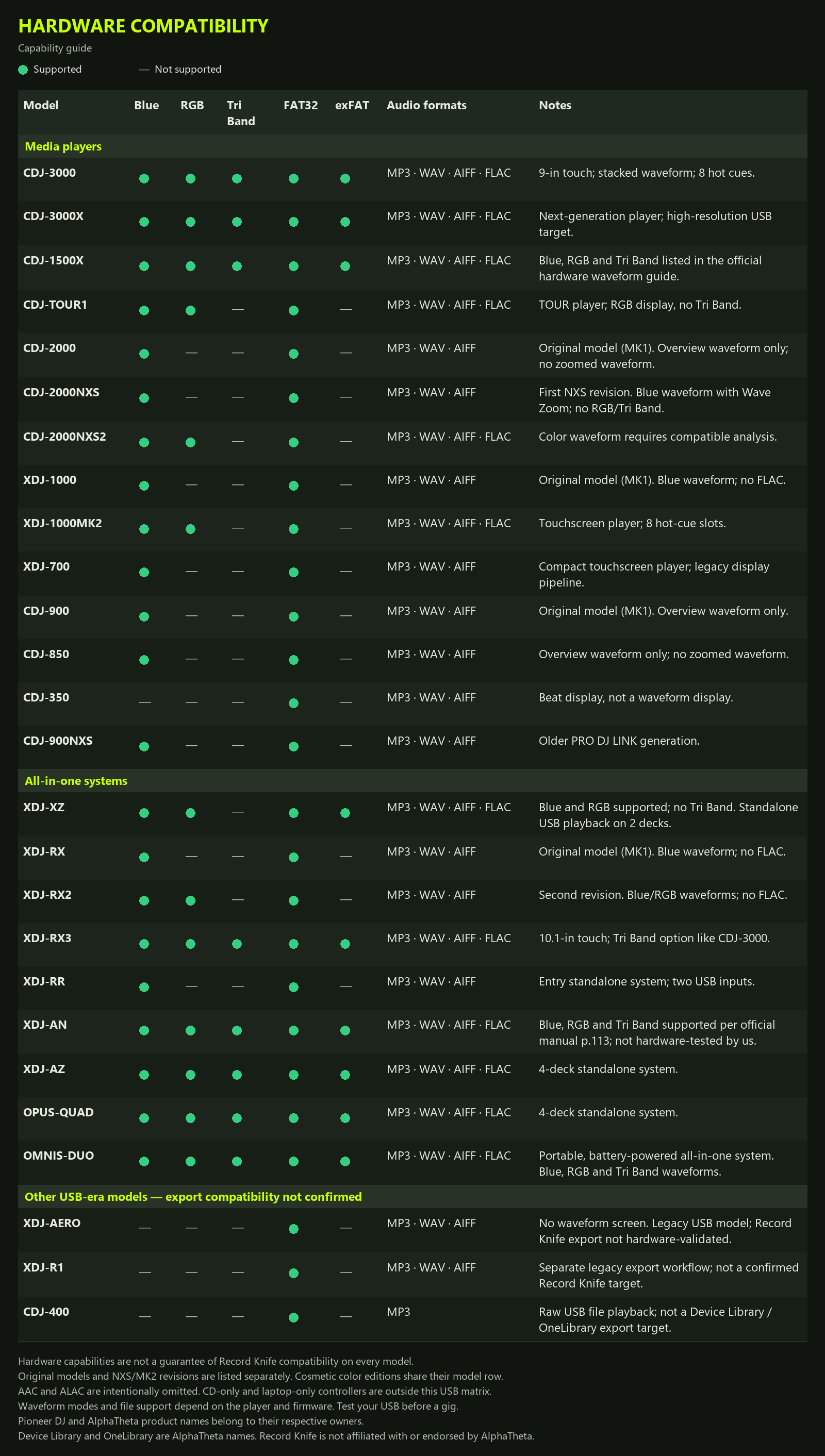
Download compatibility matrix · Download waveform color sheet
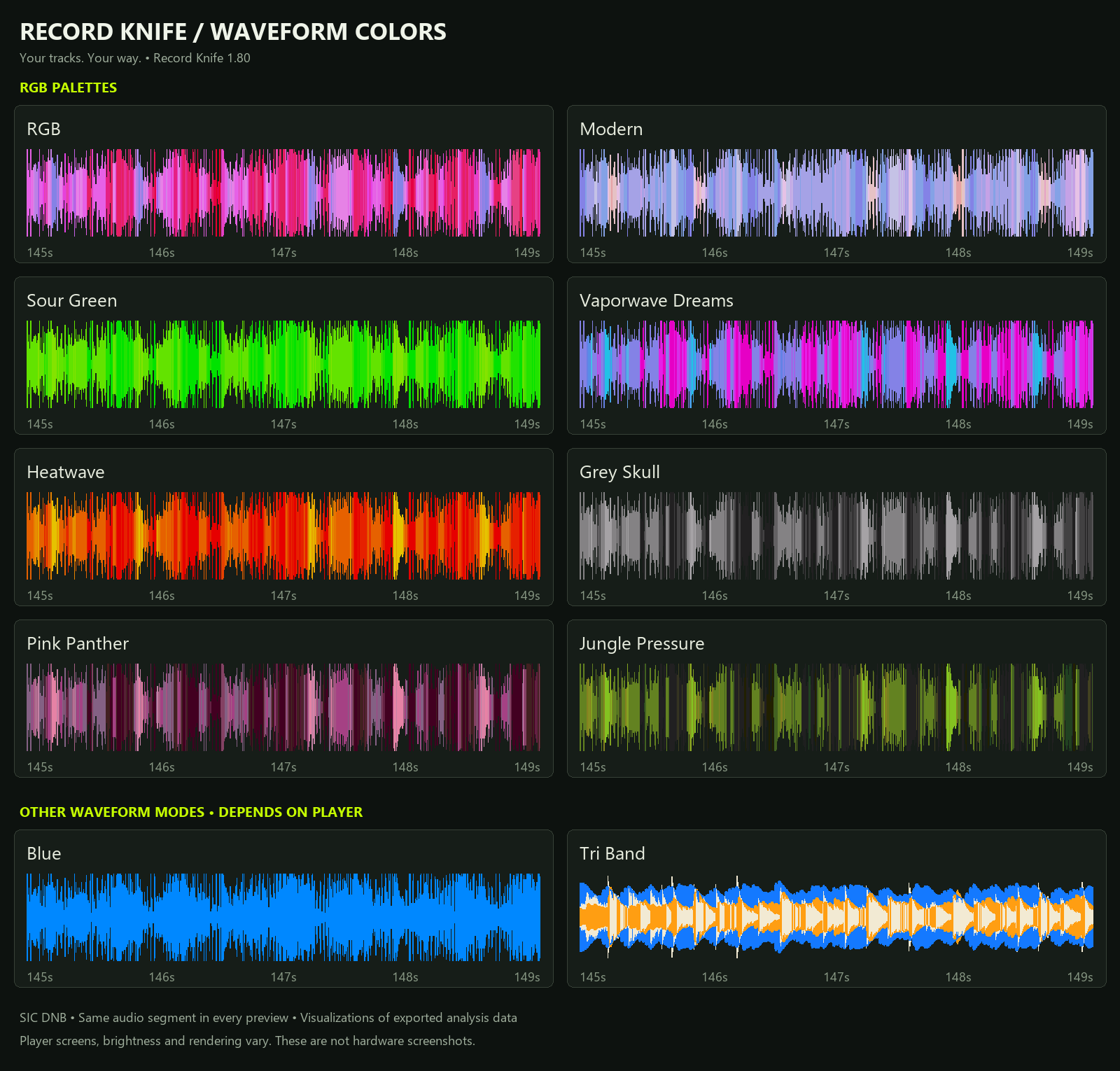
Waveform colors
Choose a look for each track. Select an image for a closer view. For Triband, select 3Band in the hardware device menu. Darker fallback blues indicate the current hardware settings cannot display the selected colors.










Free & Pro.
Free: one file at a time, up to 100 tracks and 10 playlists per USB. Pro: batch processing, no app-imposed track or playlist limits, Crate Digger and extended tools. Both are coming soon.
| Feature | FreePermanent Free version | Pro |
|---|---|---|
| Processing limit | One file at a time | Batch processing |
| USB track limit | 100 tracks total per USB | No app-imposed track limit |
| Playlist count and sizes | 10 playlists · 100 tracks total per USB | Unlimited playlists and playlist sizes |
| Extended FAT32 over 32 GB | None | Included |
| USB Doctor | Check, repair and standard formatting up to 32 GB | All tools included |
| Subscription | None | None |
| Expiration | Never | Never |
| Lifetime updates | Included | Included |
| Metadata & filenames | ||
| Edit Artist and Track Title | Included | |
| Edit BPM and musical key | Included | |
| Additional Album, Year and Genre metadata | Included | |
| Rename to Artist - Track Title | Included | |
| Title Case cleanup | Included | |
| Embed or replace album artwork | Included | |
| Analysis & audio | ||
| BPM analysis | Included | |
| Key analysis | Included | |
| Integrated LUFS analysis | Included | |
| Waveform preview | Included | |
| Waveform color schemes | Included | |
| Half / Double BPM correction | Included | |
| Loudness adjustment | Included | |
| WAV extensible-format patching | Included | |
| Convert to WAV | Included | |
| Convert to AIFF | Included | |
| Convert to FLAC | Included | |
| Convert to MP3 (320 kbps / 48 kHz) | Included | |
| Standard lossless conversion preset: 16-bit / 48 kHz | Included | |
| Hi-res conversion preset: 24-bit / 96 kHz | Included | |
| Playlists & USB libraries | ||
| Universal USB export | Included | Included |
| Convert an existing drive to Universal USB | Pro only | Included |
| Create and name playlists | Included | |
| Add and arrange playlist tracks | Included | |
| Cue points and cue colors | Included | |
| Legacy Device Library output | Included | |
| Modern OneLibrary output | Included | |
| USB waveform and beatgrid generation | Included | |
| USB album artwork | Included | |
| Safely eject USB | Included | |
| Deck personalization | ||
| Browse categories and ordering | Included | |
| Sort options and ordering | Included | |
| Artist display column | Included | |
| Waveform display preferences | Included | |
| Key display format | Included | |
| Playback, load-lock and needle-lock preferences | Included | |
| Hot cue loading and colors | Included | |
| Quantize, sync and tempo preferences | Included | |
| Jog mode and vinyl speed preferences | Included | |
| Beat Jump value | Included | |
| Language and display brightness | Included | |
| Jog ring, pads and indicator preferences | Included | |
| Mixer fader-curve preferences | Included | |
| Stereo headphone preferences | Included | |
| Beat FX, microphone and MIDI preferences | Included | |
| Apply settings to connected supported devices | Included | |
| Restore preference defaults | Included | |
| Album art on supported jog displays | Included | |
| Custom jog art upload, square crop and save | Included | |
| USB Doctor | ||
| Drive information | Included | |
| Model-specific compatibility information | Included | |
| USB filesystem check | Included | |
| USB repair | Included | |
| Standard FAT32 partition and quick format (up to 32 GB) | Included | |
| Help & guidance | ||
| Help and compatibility tips | Included | |
| About and product information | Included | |
| Crate Digger | — | Included |
Keep your originals safe.
Back up your master collection before editing. Safe Mode adds confirmation for destructive operations. Formatting erases the selected drive. Prepare your tracks in Local Folders before exporting your playlists.